

Design guidelines for engraved sheet metal parts.
Here you'll find important specifications for creating and positioning engravings on sheet metal parts.
1. Step-by-step guide to creating an engraving
In most CAD systems, an engraving is designed as a drawing or sketch on the surface of the sheet metal part. Unfortunately, common CAD systems export such sketches very differently to the STEP format, which makes it difficult for the Blexon algorithm to reliably detect an engraving.
That's why we recommend the following procedure to engrave a sheet metal part. Blexon then detects the engraving reliably.
- Draw the sheet metal part as usual in CAD and add the desired engraving as a sketch on the surface.
- Extrude the sketch by -0.2 mm. For Blexon to reliably detect the engraving, the range must be between -0.1 mm and -0.3 mm. You are thus „embossing“ the engraving into the sheet metal part.
- Export the model as a STEP file and then upload it to Blexon .
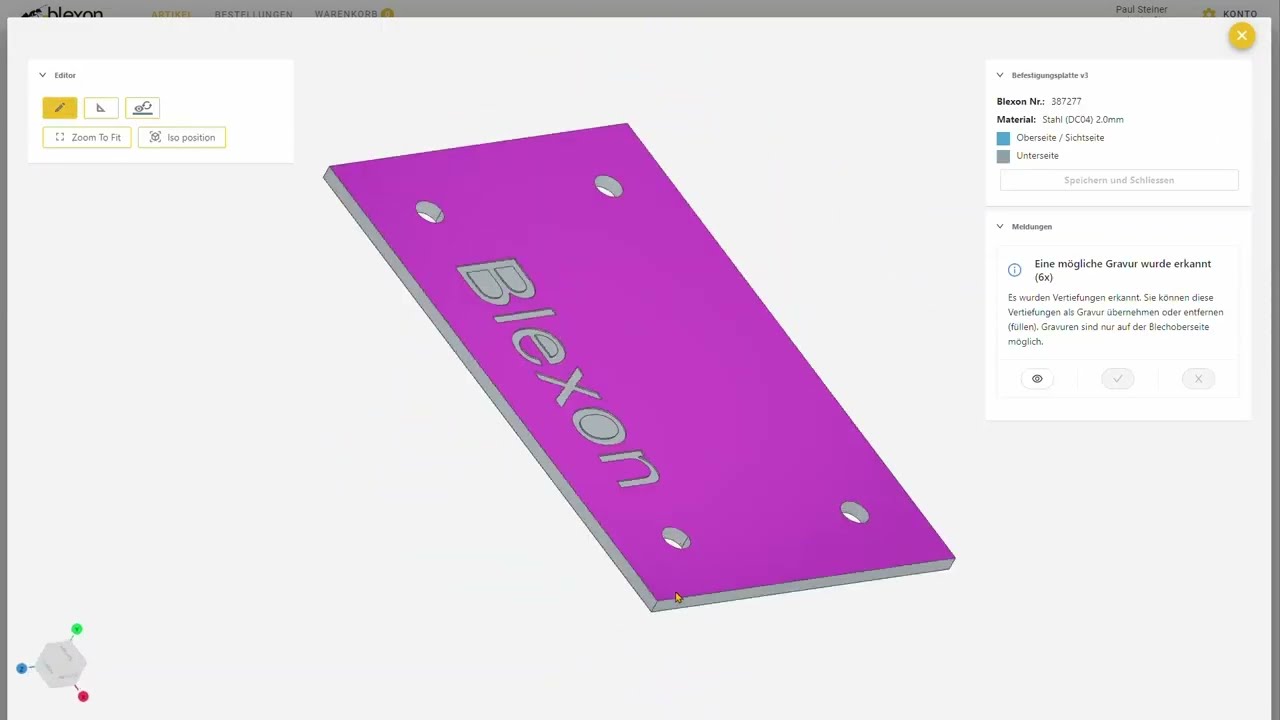
- Blexon now detects the engraving automatically. You only need to open the item in the browser CAD and confirm the engraving with a click on the checkmark. Alternatively, you can reject the engraving. To do so, click the cross. Blexon then removes the engraving from the sheet.
- Save and close the sheet metal model in the browser CAD.
The following video shows these steps using an example. It also shows how easily you can upload CAD models from Fusion 360 with the Blexon Plug-In .
 By playing, YouTube is loaded and you agree to its cookies.
2. Notes on engravings
Please also note the following:
- Only the contour can be engraved. Filled areas cannot be engraved reliably or economically with the cutting laser.
- Contours must always be closed.
- You achieve the best engraving result on stainless steel. The contrast is highest with this material. Aluminium is only suitable for engraving to a limited extent. The contrast is not very high.
- The engraving must be on the top/visible side of the sheet metal part. The back cannot be engraved.
- Powder-coated sheet metal parts cannot be engraved.
